Change your fonts
Pick the fonts for your headings, small accents and body text, and choose whether headings are uppercase.
Change a font
Section titled “Change a font”- Select the Theme settings icon at the top left of the editor.
- Select Typography (marker 1).
- Select Heading font (marker 2), then choose a font. It is used for headings and large headlines.
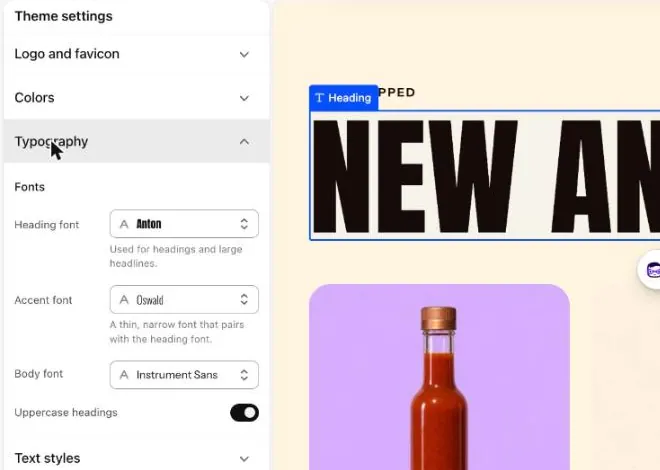
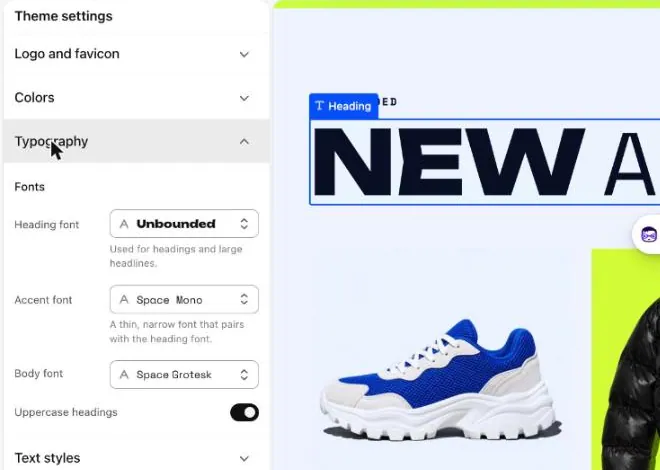
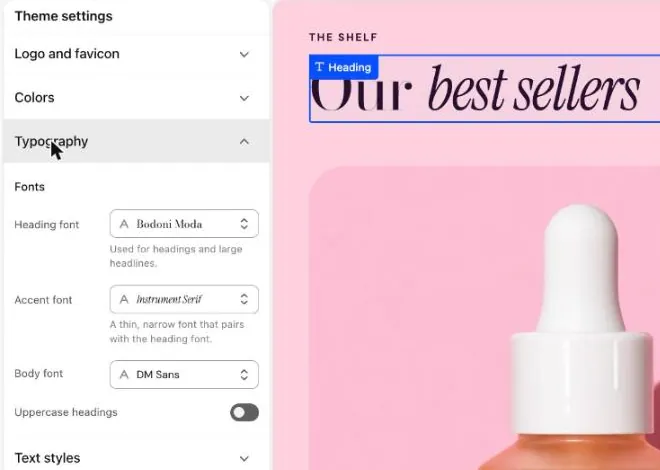
- Select Accent font, then choose a font. It is a thin, narrow font that pairs with the heading font.
- Select Body font, then choose a font. It is used for paragraphs and most small text.
- Check the preview.
- Select Save.
Switch uppercase headings on or off
Section titled “Switch uppercase headings on or off”- Under Typography, find Uppercase headings (marker 3).
- Turn the switch on for capital letters. Turn it off to show headings as you typed them.
- Select Save.
Change text sizes
Section titled “Change text sizes”Text styles set the size and spacing of each kind of text, such as Heading 1 or Body. Open Theme settings, then Text styles. See Text styles for every choice.
Fonts in your theme
Section titled “Fonts in your theme”You are looking at the Picante theme. Change it with the Theme switch in the top bar.
Picante fonts
- Heading font: Anton (400)
- Accent font: Oswald (300)
- Body font: Instrument Sans (400)
- Uppercase headings: On
Overdrive fonts
- Heading font: Unbounded (800)
- Accent font: Space Mono (400)
- Body font: Space Grotesk (400)
- Uppercase headings: On
Pastille fonts
- Heading font: Bodoni Moda (400)
- Accent font: Instrument Serif (400 italic)
- Body font: Dm Sans (400)
- Uppercase headings: Off
Good to know
Section titled “Good to know”- Each style starts with its own fonts. See Styles.
- Fewer fonts look calmer and load faster. Try changing only the Heading font first.
- Buttons and the header menu have their own Font setting.
- Long headings can look too wide in a new font. Shorten the heading or check the preview on a phone.
See every setting: Typography and Buttons.